
TradeVault — Portfolio Activity Workbench
Live — beta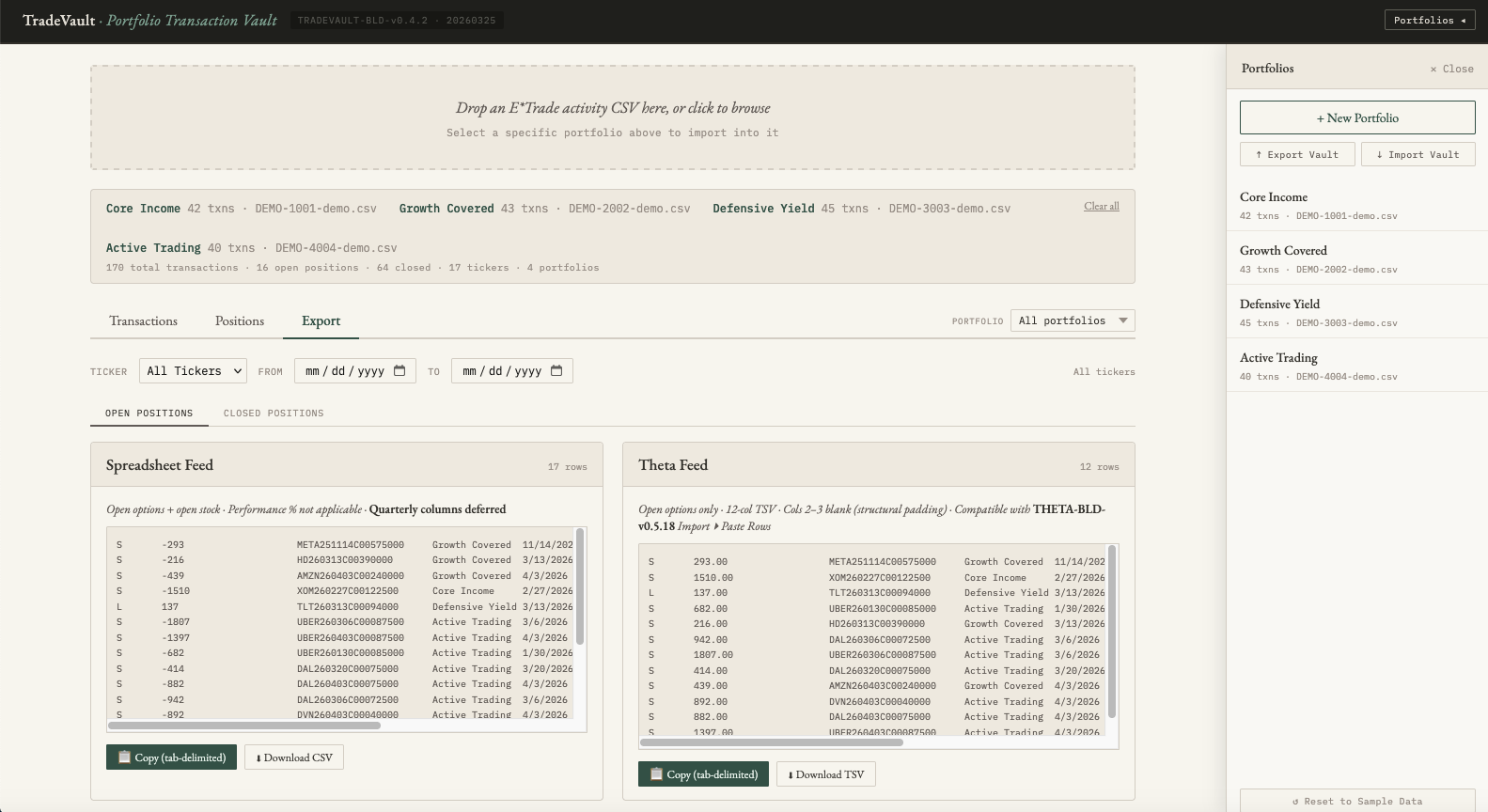
E*TRADE's activity CSV export is a flat transaction log — every buy, sell, assignment, expiration, and roll recorded as individual rows with no positional context. The export tells you what happened. It does not tell you what you currently hold, how a roll chain connects across dates, whether an assignment closed a position or opened new stock exposure, or what your return percentage is on a completed trade. Building that picture manually requires a separate spreadsheet that is always one import behind.
The problem compounds across multiple accounts. There is no native way to see a reconciled view of open options, closed positions, and stock holdings across several E*TRADE accounts simultaneously. Operators managing more than one portfolio either maintain parallel spreadsheets with all the drift and error that entails, or accept that their working picture of their own positions is always approximate.
TradeVault is a browser-based application that accepts E*TRADE activity CSV files, parses the transaction history, and reconstructs the full position picture from raw event data. Imported transactions are organized into named portfolios. The system detects roll chains by matching same-date buy-to-close and sell-to-open pairs, identifies assignment sequences, and classifies each position as open or closed. All state is held in the browser.
The working set persists across page refreshes via session storage and exports as an encrypted vault file using PBKDF2 key derivation and AES-GCM encryption with a user-controlled passphrase. Portfolio order is operator-defined via drag-to-reorder and is preserved through the full export/import cycle. The export view generates structured tab-delimited feeds ready for paste import into the Theta Workbench, with column-labeled previews for both the spreadsheet feed and the Theta-compatible feed.
Major working surfaces:
- Portfolios — create, rename, delete, reorder, import vault, export vault, reset to sample data
- Transactions — normalized transaction table, filterable by portfolio, ticker, event type, and date range
- Positions — reconstructed open and closed positions with roll and assignment metadata
- Export — spreadsheet and Theta feed previews with copy and download actions
Before: flat broker transaction exports, a separate spreadsheet maintained manually, no reconciled view across multiple portfolios, and a working picture of open positions that was always slightly wrong. After: reconstructed position state across named portfolios, an encrypted local vault, and structured exports ready for options analysis — sourced entirely from the broker's own data.
The demo at tradevault.scvdata.com loads the production application with a synthetic dataset of approximately 170 transactions across four sample portfolios. The sample data is representative of the transaction types the system handles — covered calls, short puts, roll chains, assignments, and stock activity — but uses no real account data. The application is a self-contained HTML file with no server-side dependencies: all parsing, position reconstruction, encryption, and export logic runs entirely in the browser. Visitors can load their own E*TRADE CSV files directly; SCVdata does not store or proxy CSV contents, reconstructed positions, or vault data.
TradeVault is an independent SCVdata workbench for local analysis of user-supplied brokerage exports. It is not affiliated with, endorsed by, sponsored by, or operated by E*TRADE, Morgan Stanley, or any brokerage. It is not a financial product, does not provide investment advice, and does not connect to any brokerage API or account system. All data processing occurs locally in the user's browser.